


Initial project goal
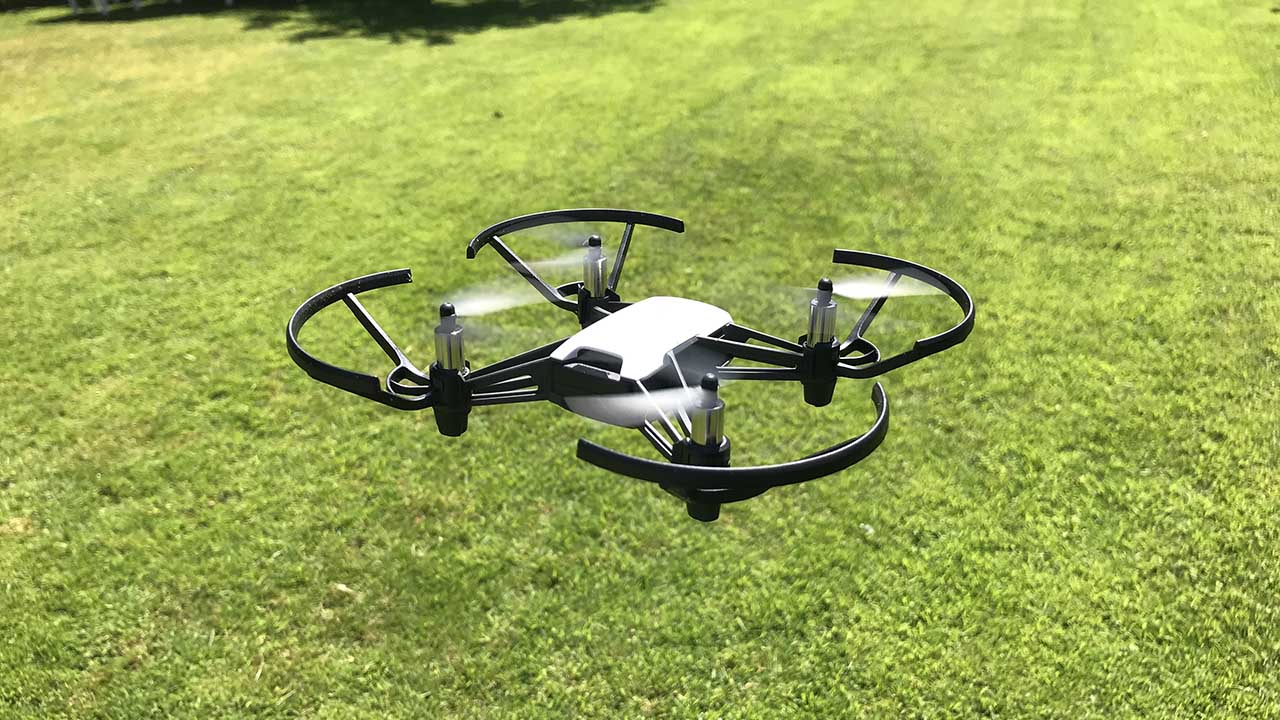
Drones are a fascinating new technology and are becoming more commonplace by the day. The way they’re controlled is usually with a handheld joystick controller or a phone. In the initial project brief, I considered implementing drone controlling methods using body position (whole-body gesturing), eye-tracking or brainwave analysis.
The steps I originally envisioned were:
-
Figure out which of these methods would be most interesting to implement.
-
Figure out which kind of drone to use that is both programmable and within my budget, then acquire said drone.
-
Implement the chosen method, documenting the process in an instructional manner to encourage others to try this.
I quickly realized I wanted to do body position analysis, because I would not need any additional equipment for these and I felt that gesturing for a drone to move in specific ways was the most intuitive option of the list.
I considered several drone options, and after some research I ended up choosing the DJI Tello Drone because it is fairly cheap and programmable using Python through the DJITellopy library, available at https://github.com/damiafuentes/DJITelloPy. The available commands can be found on page 3-5 of the Tello User Guide (available via https://dl-cdn.ryzerobotics.com/downloads/Tello/Tello%20SDK%202.0%20User%20Guide.pdf).
Once this preliminary research was done and the drone arrived, I could start the implementation process.
Body Position Analysis implementation
I had never done anything with body position analysis before, so began by doing research into several options. I ended up choosing Mediapipe and OpenCV to recognize the positions due to their widespread use. I implemented this in such a way that I could use either pre-existing videos or webcam input:
if (vidName == "webcam"):
    cap = cv2.VideoCapture(0, cv2.CAP\_DSHOW)
else:
   cap = cv2.VideoCapture(vidName)
I wrote several body positions as commanding positions:
-
arms out - neutral
-
arms angled up - go up
-
arms angled down - go down
-
left arm out, right arm down - go left
-
right arm out, left arm down - go right
This was a fun mathematical exercise, as MediaPipe generates the
locations of specific points (shoulder, elbow, wrist, …) in
screen-relative coordinates and I had to extract that information to
calculate the angles between, for example, the arm and the torso of the
person in the video. I implemented a function calculating the angle
between two body coordinates and the hinge between them. For example,
angle_LS was the angle of the left shoulder, calculated using the
position of the left hip (LH) and left elbow (LE). See the code
snippet below.
Using these angles, I then inferred which command should be sent.
# get the angles at which the joints are bent right now
angle_LS = pe.calcAngle(LH, LE, LS)
angle_LE = pe.calcAngle(LS, LW, LE)
angle_RS = pe.calcAngle(RH, RE, RS)
angle_RE = pe.calcAngle(RS, RW, RE)

if ((110 < angle_LS) & (angle_LS < 180)):      # left arm up
    if ((110 < angle_RS) & (angle_RS < 180)):  #   and right arm up
        if(isFlying):
            return 'up 10cm'
        else:
            return 'takeoff'
Note the if (isFlying) statement in the above code snippet. The drone
needed to do different actions depending on whether or not it was
currently flying; for example, if it is not flying and the user gestures
up, we need to send a takeoff command. If the drone is flying, that
should be a move_up command instead. Therefore we track the current
state of the drone and send the commands based on both the current state
and the pose.
One major challenge was to figure out the frequency of generating commands, as glitches in the body position analysis would occasionally fire random commands that were not intended by the user. In order to address this and increase reliability, I implemented a best-out-of-three system to reduce the likelihood of such single-frame glitches impacting the commands that were being sent. Commands were added to a deque and only forwarded to the drone if it was a valid command and matched the latest two commands (see the code snippet below). This did introduce a minor reduction in drone responsiveness, as it would take several frames of a new position to update the commands, but improved the results enough (and was minor enough) that this was deemed an acceptable trade-off.
command = getCommand()
commandsTemp.append(command)
commandsTemp.popleft()

if((commandsTemp[0] == commandsTemp[1]) & (commandsTemp[1] == commandsTemp[2]) & (commandsTemp[0] != None)):
    r = commandsTemp[0]
    telloResponse = tello.command(r)
I should note that my implementation was helped massively by existing tutorials, mainly the one at https://techvidvan.com/tutorials/human-pose-estimation-opencv/ to help me get started with MediaPipe.
Connecting to the drone
I connected to the DJI Tello drone using the method described in their
documentation. This is done in the tello.py file, which is available
on my Github:
https://github.com/ilse-arwert/telloControl/tree/merging-Tello-and-PoseEstimator.
Connecting the systems
The final step was to use the commands generated with the approach described above to actually control the drone. At first, I would simply send the commands to the drone as fast as they were being generated. This was in conflict with the way the drone expected to receive commands, as the commands were being sent in succession without waiting for the drone to finish executing the previous command, causing the commands to back up and the drone to not respond properly. I fixed this by causing the process to wait until the Tello drone would respond that the last command was finished.
if((commandsTemp[0] == commandsTemp[1]) & (commandsTemp[1] == commandsTemp[2]) & (commandsTemp[0] != None)):
    r = commandsTemp[0]
    telloResponse = tello.command(r)
    while (telloResponse != "ok"):
        time.sleep(1)
This worked, but did slow the command processing down due to all the waiting. In additon to this, because the Tello would, for example, go up 30 centimers and then pause to wait for another command (which might still be ‘up’) the flight pattern was quite jerky. However, by this time I unfortunately ran out of time for the project.
Future Work
In the future, it would be beneficial to figure out a way for the
commands to be sent continuously, perhaps by cancelling existing
commands before sending a new one, or instead of defining a set distance
(like up 30cm) simply commanding up and letting that run until a new
command was received.
It would also be great, if extra challenging, to implement the option to use the Tello’s own camera instead of a laptop webcam. The obvious challenges are that this reduces how far away the drone can fly from the user before this becomes unfeasible, but would make the interaction feel more immersive as opposed to gesturing at a laptop to make the drone move.
I think this work has definite potential as an intuitive drone controlling method, and could certainly be used for e.g. non-preprogrammed drone/dancer performances, which is where the original inspiration comes from. However, there is certainly still more work to be done before this will work well.
What I learned
Before this project, I had never flown a drone or interpreted a body position. Also, this increased my skill in linking different systems together and working around their idiosyncrasies, such as the interaction between the Tello drone wanting to finish the current command before receiving a new one and how that interacts with a continuously updating system like Mediapipe.
As part of the output of this project I’ve put the instructions, code and snippets together into a blog post for other programmers to peruse, as well as putting the full code base online at Github: https://github.com/ilse-arwert/telloControl/tree/merging-Tello-and-PoseEstimator. In this way, I fulfilled the stated project goals of
-
generating new knowledge; and
-
educating others on how to achieve this themselves.
Unfortunately, due to the limited scope of this project, I was unable to conduct an evaluation on how intuitive the current iteration of gestures is to the average user, which would be an interesting challenge for any future work! Luckily, changing the body position selection is fairly easy, so I just might do a mini-survey on my own time in the future. If I do, I’ll make another blog post and share that information as well!